A.1 Console links
All consoles are HTTPS with valid certificates.
| Tool | What you use it for | Link |
|---|---|---|
| Golonex Portal | The business app — SSO login, Finance actions, the HRIS feed | app.iamlab.genbay.co |
| Keycloak | Identity Provider — SSO, MFA, LDAP federation, login events | keycloak.iamlab.genbay.co/admin/ |
| midPoint | IGA — joiner/mover/leaver, roles, approvals, reconciliation | midpoint.iamlab.genbay.co |
| Teleport | PAM — just-in-time SSH with MFA, recorded sessions | teleport.iamlab.genbay.co |
| Apache Guacamole | Clientless recorded session gateway | guacamole.iamlab.genbay.co |
| Wazuh | SIEM — security events and the post-termination alert | wazuh.iamlab.genbay.co |
| Lab landing page | Index of all of the above | iamlab.genbay.co |
A.2 The Golonex organisation
Everyone who exists in the lab today, plus the identities you create yourself. Reporting lines come from the HR feed — the authoritative source that drives everything downstream.
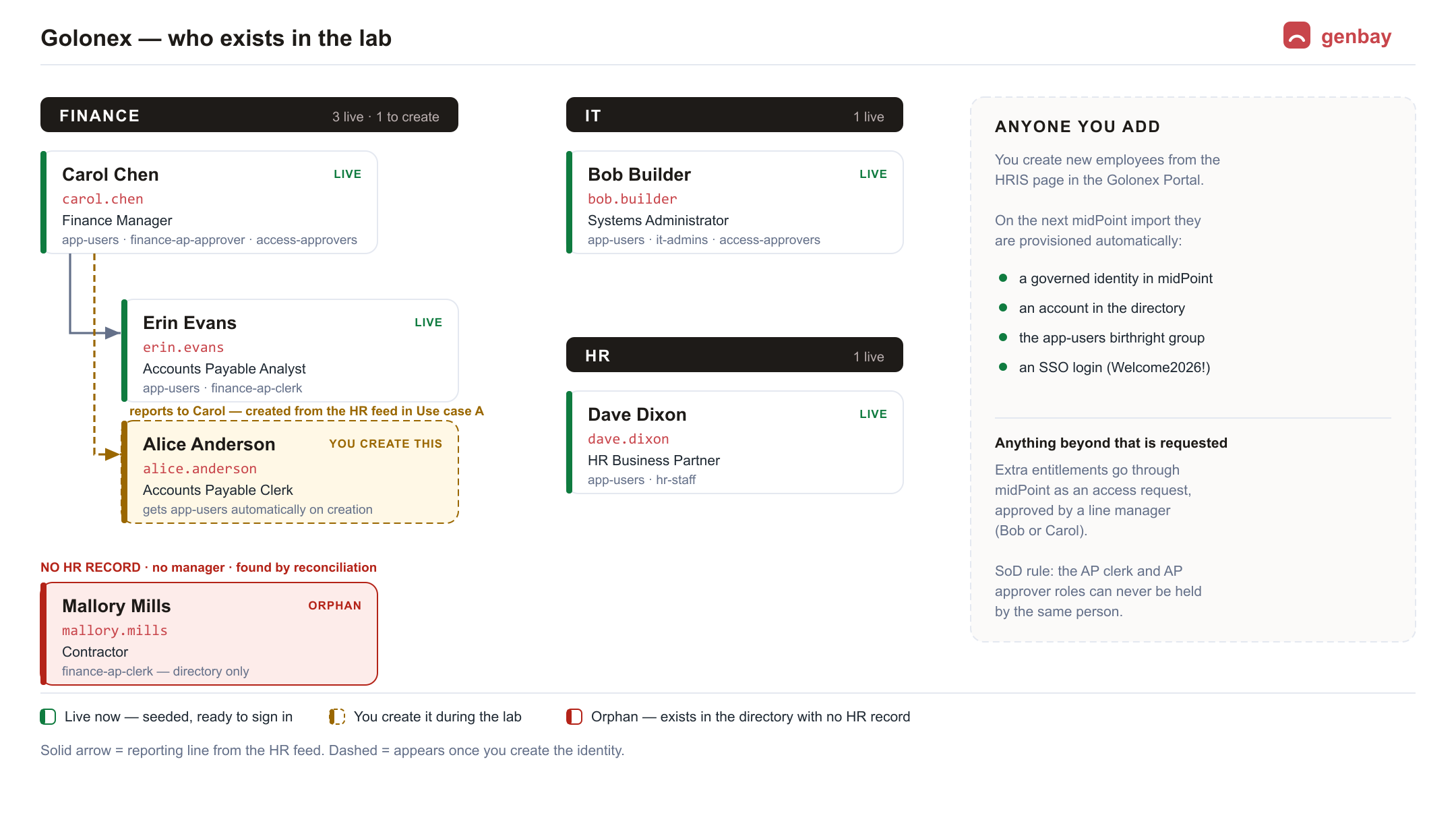
A.3 Golonex workforce — the identities you operate on
These are the synthetic employees in the directory. They all share one training password:
Welcome2026!. Use them to sign into the Golonex Portal.
| Username | Person | Department | Entitlements | Use them to… |
|---|---|---|---|---|
bob.builder | Bob Builder | IT | app-users, it-admins, access-approvers | see the IT Admin page; approve access requests |
carol.chen | Carol Chen | Finance | app-users, finance-ap-approver, access-approvers | approve payments; approve access requests |
dave.dixon | Dave Dixon | HR | app-users, hr-staff | edit the HRIS feed — joiners, movers, leavers |
erin.evans | Erin Evans | Finance | app-users, finance-ap-clerk | create invoices; test a denied action |
mallory.mills | Mallory Mills | Finance | finance-ap-clerk (directory only) | the orphan — no HR record; found by reconciliation |
alice.anderson | Alice Anderson | — | does not exist yet | you create her in Use case A and follow her to off-boarding |
Welcome2026!.A.4 Administrator accounts
You operate the lab as the IAM administrator. These are the console sign-ins:
| Console | Username | Password |
|---|---|---|
| Keycloak (admin console) | admin | qhDEGX28XoFx5ZZIdFcU |
| midPoint | administrator | THVvxzLYjL0zSJoChrS7 |
| Apache Guacamole | guacadmin | Wv67ZbdWYq32fYMZAa1! |
| Wazuh dashboard | admin | 1qhgCv1G2um8oyARfnAa1. |
| Teleport | golonex-admin | you set it yourself — see A.4 |
administrator you can
see a request and stop it, but you cannot decide it. To approve, sign in as one of the approvers —
bob.builder or carol.chen, password Welcome2026! — and use
Approvals. They can sign in because the Access Approver role grants
midPoint's built-in Approver rights, which is exactly how it should work: the business role
carries the tool access the job needs.admin account signs into the master realm. The Golonex workforce lives in
the golonex realm — switch realms using the selector at the top-left of the admin console.A.5 Teleport — first-time sign-in
Teleport does not use a shared password. Your instructor gives you a one-time invite link
(of the form https://teleport.iamlab.genbay.co/web/invite/…). Open it once and you will:
- Choose your own password for
golonex-admin. - Enrol a second factor — scan the QR code with an authenticator app (Google Authenticator, Authy, 1Password…). MFA is mandatory for privileged access.
- Land in the Teleport web UI, where
golonex-app-01is waiting under Resources.
docker exec teleport tctl users reset golonex-admin — it prints a URL valid for 8 hours.
Delete the :3080 from that URL before using it. tctl appends
Teleport's internal listen port, which is deliberately not published; Caddy serves the console on 443. The
working form is https://teleport.iamlab.genbay.co/web/reset/<token>.| What | Value |
|---|---|
| Console | teleport.iamlab.genbay.co |
| Cluster | golonex |
| Web login | golonex-admin — roles golonex-pam-ops, access, editor |
| Password | none stored — you choose it at enrolment |
| Second factor | mandatory — TOTP from an authenticator app (second_factor: otp) |
| SSH login on the targets | golonex-ops — the only login the role permits |
| Session TTL | 8 hours |
Teleport is the one console in this lab with no password written down anywhere, and that is deliberate: privileged access should not depend on a shared secret in a document.
A.6 The servers you connect to
| Server | Reached through | Login on the server |
|---|---|---|
golonex-app-01 | Teleport (just-in-time SSH) | golonex-ops — granted automatically by your Teleport role |
golonex-db-01 | Guacamole → connection "golonex-db-01 (SSH, recorded)" | golonex-ops — already saved in the connection |
golonex-host-01 | Teleport (just-in-time SSH) | golonex-ops — the container platform itself |
golonex-app-01 is the Teleport container, and
golonex-db-01 is a small OpenSSH container — both named to read like enterprise servers.
golonex-host-01 is the real thing: the Debian machine running all seventeen containers. From a
recorded session there you can docker exec into any component of the lab, which makes it the
single most powerful access path in the environment.golonex-host-01, golonex-ops belongs to the docker group — which is
effectively root on that machine. That is the correct privilege for a container-platform operator, and it is
exactly why every session is recorded keystroke by keystroke. The lesson is worth stating plainly:
PAM does not make a privilege smaller, it makes it accountable.You never type a server password: Teleport issues short-lived certificates, and Guacamole holds the credential inside the saved connection. That is the point of PAM — no standing secrets.
A.7 Directory reference
Useful when reading midPoint or Keycloak screens:
| Item | Value |
|---|---|
| Directory base DN | dc=golonex,dc=local |
| People | ou=people,dc=golonex,dc=local |
| Groups (entitlements) | ou=groups,dc=golonex,dc=local |
| Directory admin bind DN | cn=admin,dc=golonex,dc=local |
| Directory read-only bind DN | cn=readonly,dc=golonex,dc=local (the account Keycloak federates with) |
| Keycloak realm | golonex |
| Portal OIDC client | golonex-portal |
| HR feed (the authoritative source) | the HRIS page in the Golonex Portal |
A.8 Entitlements (directory groups)
| Group | Grants | Note |
|---|---|---|
app-users | Baseline Portal access | birthright — every employee gets it automatically |
finance-ap-clerk | Create supplier invoices | SoD pair — never together with the approver role |
finance-ap-approver | Approve payments (≤ 50,000 alone) | SoD pair — never together with the clerk role |
access-approvers | Approve others' access requests; approve payments > 50,000 | line-manager role |
hr-staff | View and edit the HRIS feed | scoped to the HR department |
it-admins | The IT Admin page | scoped to the IT department |
A.9 If the lab gets messy
Ask your instructor to reset it to the clean starting state. That removes any practice identities you created (including Alice), restores the four-row HR feed, clears pending approvals, and leaves the midPoint tasks ready to run. The seeded workforce above comes back exactly as listed.