The whole lab is one story: a new employee — Alice Anderson — is hired, given access, moved, and eventually off-boarded, while the security team watches. This chapter first shows the map and the wiring, then presents each stage of Alice's story as a flowchart followed immediately by the hands-on steps. Read each flowchart left to right (1 → 2 → 3), then do the steps beneath it.
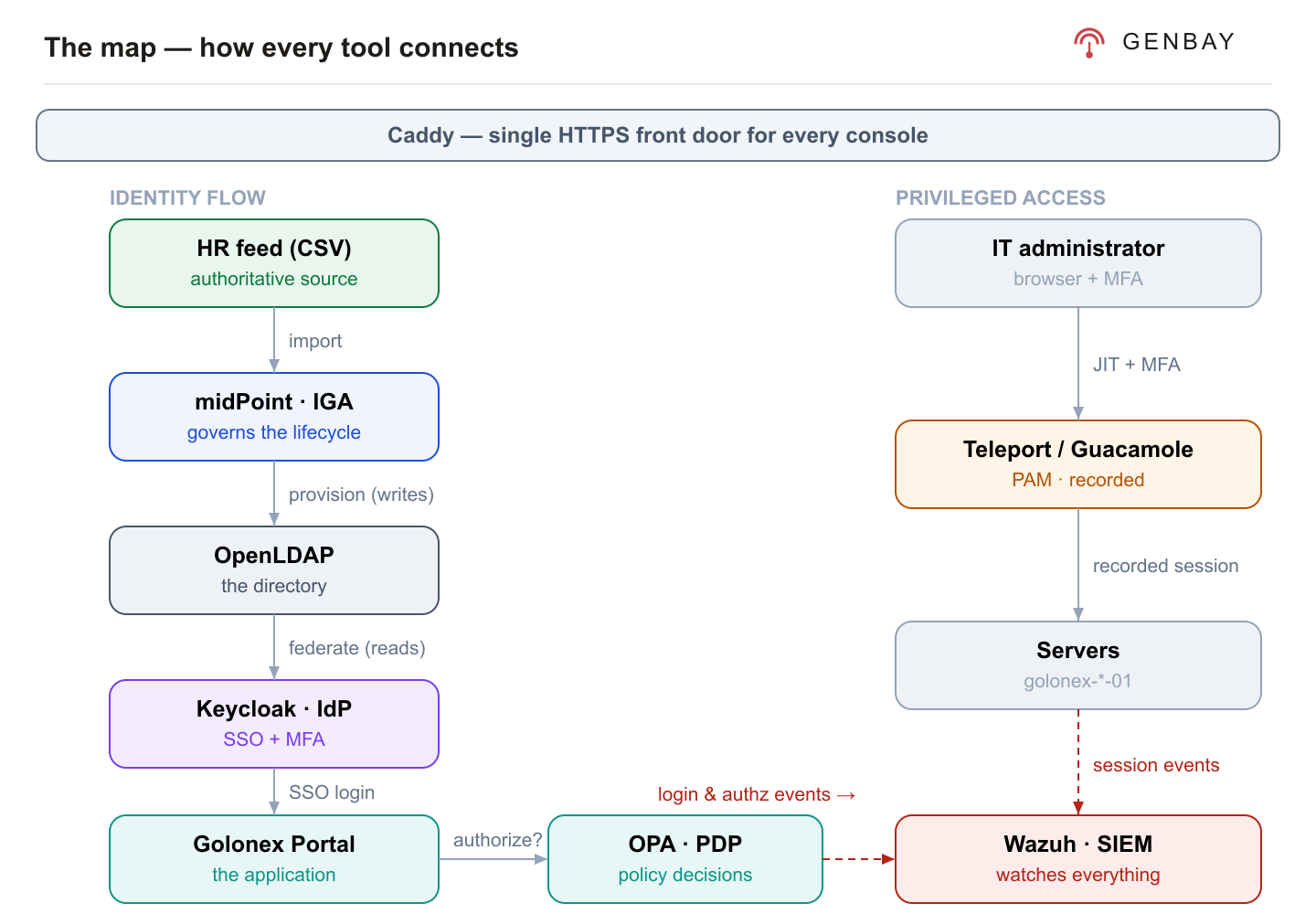
3.1 The integration points — the wiring
Individually the tools are useful; the power is in how they connect. These are the exact joints:
| Connection | How | Why it matters |
|---|---|---|
| HR feed → midPoint | CSV connector; the file is the authoritative source | Joiners/movers/leavers originate in one place |
| midPoint → OpenLDAP | LDAP connector; midPoint is the only writer | Governance drives the directory — not hand-editing |
| Keycloak → OpenLDAP | LDAP user federation (read-only bind) | The accounts that exist are exactly the accounts that can log in |
| Portal → Keycloak | OIDC client (golonex-portal) | The app never handles passwords; SSO + MFA are centralised |
| Portal → OPA | Decision API call per action | Authorization is externalised as policy-as-code |
| Keycloak & Portal → Wazuh | Event forwarder + shared JSON log → Wazuh localfile + rules | Security events become alerts |
| Teleport / Guacamole → servers | JIT SSH / brokered session, both recording | Privileged access is accountable |
| Everything → Caddy | Reverse proxy per subdomain over HTTPS | One front door; nothing else exposed |
The one idea to remember
midPoint writes the directory; Keycloak reads it. That single shared source of truth is why a
change in governance (a disable, a role removal) instantly changes what a person can authenticate to and do.
The cast (for the walk-throughs)
Seeded users, all with password
Welcome2026!: bob.builder (IT),
carol.chen (Finance manager / approver), dave.dixon (HR),
erin.evans (AP clerk). Mallory Mills exists only in the directory (no HR
record). Alice Anderson does not exist yet — you create her and follow her through.Joiner — onboard Alice from the HR feed

- In the Portal as
dave.dixon(HR), open HRIS and add a joiner: Alice Anderson, Finance, "Accounts Payable Clerk". - In midPoint, run the HR feed import task ("Run now"). Open Alice — she is enabled, in Finance, with the Employee birthright role.
- On her Assignments tab, confirm she holds Employee (birthright) — nobody assigned it; the user template gives it to every HR-sourced identity. Her Projections tab shows the OpenLDAP account that role created.
- Confirm the baseline entitlement in Keycloak › Groups ›
app-users› Members — she is there. That group membership is what the birthright role provisioned, and it is the baseline access every employee gets. (Group membership is not shown on the Projections tab — midPoint does not cache entitlement associations on the account, so look at the role that granted it, or at the directory through Keycloak.) - In the Portal, sign in as
alice.anderson/Welcome2026!— she can log in. Identity flowed HR → IGA → directory → IdP → app with no manual account creation.
Login & authorization — proven once, checked every action

- As
erin.evans(AP clerk) in the Portal, open the IT Admin page — you are denied, with OPA's reason ("missing entitlement"). Least privilege. - As
bob.builder(IT), the same page opens. Same app, different entitlements, decided by OPA per request. - As an AP approver, try approving a payment above 50,000 without the manager group — OPA denies it and explains a manager is required. That is ABAC: the decision depends on the amount, not just the role.
Access request, approval & segregation of duties
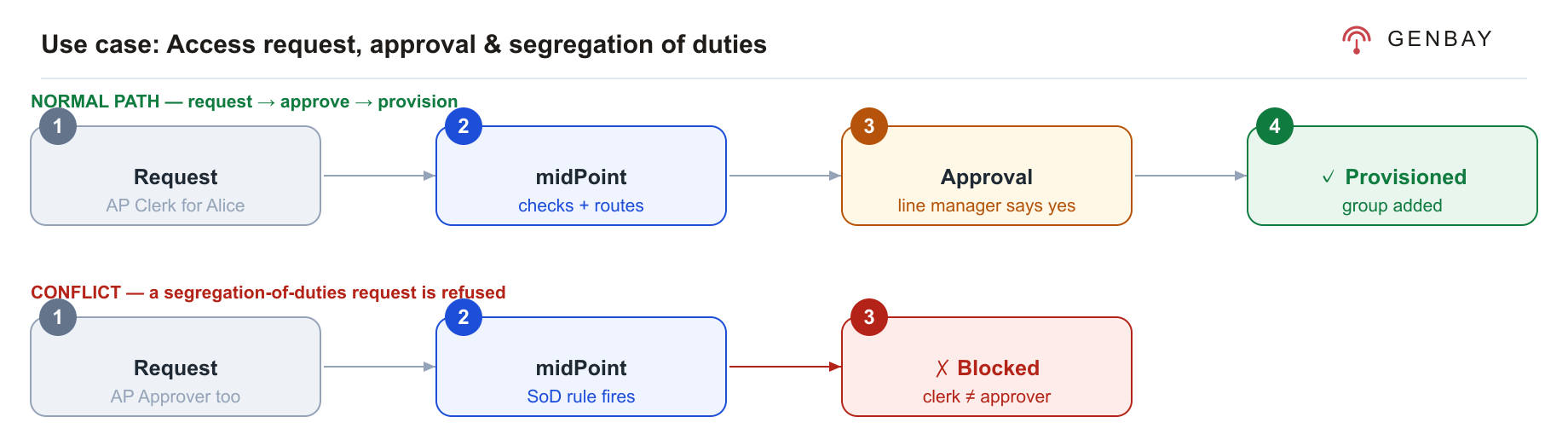
- In midPoint, request Finance AP Clerk for Alice. It does not apply immediately — it raises an approval routed to a line manager (an Access Approver).
- Sign out and sign back into midPoint as an approver —
bob.builderorcarol.chen, passwordWelcome2026!— and approve it under Approvals. midPoint then provisions the entitlement (thefinance-ap-clerkgroup). Confirm in the Portal that Alice can now create invoices. You must approve as the assignee. midPoint shows the Approve / Reject buttons only to the person the work item is routed to — signed in asadministratoryou can see the request and stop it, but not decide it. That is the point of the control: the approver is accountable for the decision. - Now request Finance AP Approver for Alice, who already holds AP Clerk. midPoint blocks it — the two roles are segregated. She is not granted the conflicting role.
Defence in depth
Even if a conflicting grant slipped through, the Portal's OPA denies every finance action to anyone holding
both roles — the rule is enforced in the IGA tool and at the application.
Privileged access — just-in-time, and recorded

- Open Teleport, complete first-time setup for
golonex-admin(password + an authenticator app for MFA), and open a browser SSH session togolonex-app-01. Run a few commands. - End the session and play it back under Session Recordings — every keystroke captured.
- Open Guacamole, launch golonex-db-01 (SSH, recorded), run commands, close it, and replay the recording. A second, independent recorded path to privileged systems.
Mover, reconciliation, leaver & the SOC capstone
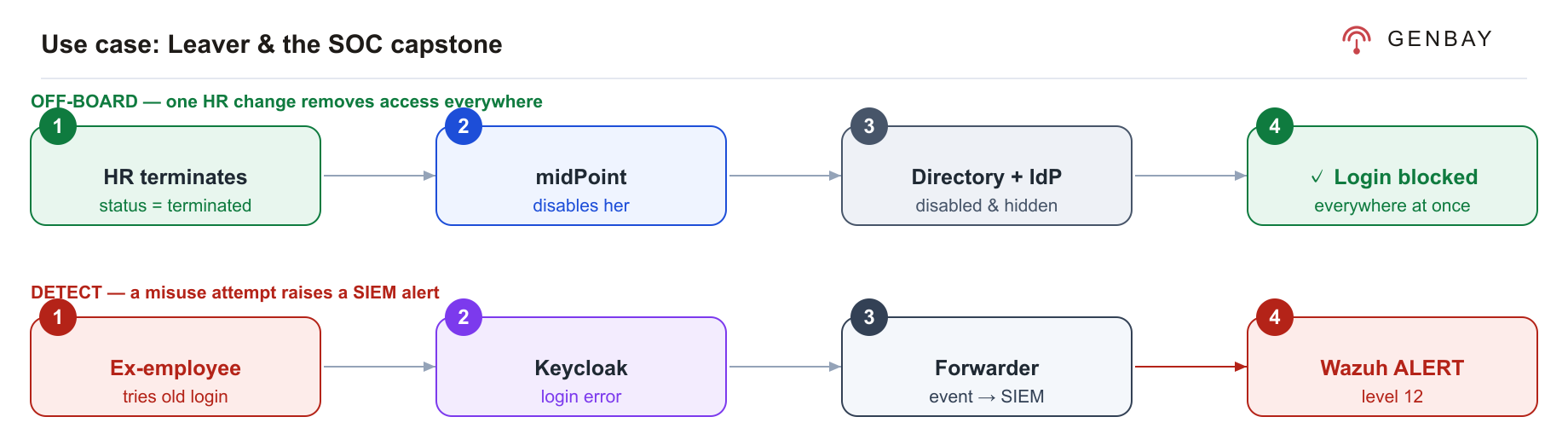
- Mover: in HRIS, change Alice's department to IT and re-run the import. Her Finance-scoped
finance-ap-clerkentitlement is automatically removed — access follows the person. - Reconciliation: run midPoint's Directory reconciliation.
mallory.millssurfaces as unmatched — a directory account with no owning identity (an orphan). That is CRD 9 in action. - Leaver: open the Wazuh dashboard in one tab. In HRIS, set Alice's status to terminated and re-run the import. She is disabled in midPoint, disabled in the directory, and hidden from Keycloak.
- Confirm off-boarding: try to sign in as Alice in the Portal — it fails. Her access is gone everywhere at once.
- Simulate misuse: attempt her old credentials a few more times. Within seconds, Wazuh raises a high-severity alert (level 12) — "login attempt for non-existent/disabled account — possible post-termination access attempt" — with the username, source IP and time.
✓ You have run the whole story
Joiner → authorize → request & approve → SoD → privileged access → mover → reconciliation → leaver →
SOC alert. That is the full loop: govern, enforce, monitor.